

How To Reset Password On Windows 7 Home Premium Without Disk
How to Reset Windows 8 / vii Password without A Deejay or Software
If you've forgotten your Windows password and you don't accept a CD or USB bulldoze laying effectually, there's no demand to worry. In this article we'll walk you through the steps to reset lost Windows 8 / vii password without using any CD, USB or software.
Of course, if y'all practise have a PCUnlocker Live CD, y'all can reset your password the like shooting fish in a barrel way with a few mouse clicks. The following pull a fast one on works with local account only. If yous're using a Microsoft Business relationship to login to your computer, yous'll need to use PCUnlocker to reset your Microsoft Account password.
How to Reset Lost Windows 8 / seven Password without Deejay?
- Plough on your reckoner. While the computer is coming up and you tin can see it maxim "Starting Windows". Agree down the Ability button for at least 5 seconds to force power off your computer.
- When a sudden power loss is detected, the next time yous turn on your calculator and it will ask you lot if you want to launch startup repair or kickoff normally. Choose the Launch Startup Repair (recommended) bill of fare.

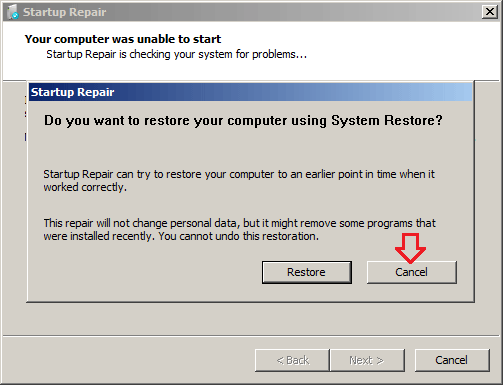
- Startup Repair will kick up and take a little while. When it asks you if you desire to restore your reckoner to an earlier point, click Cancel.
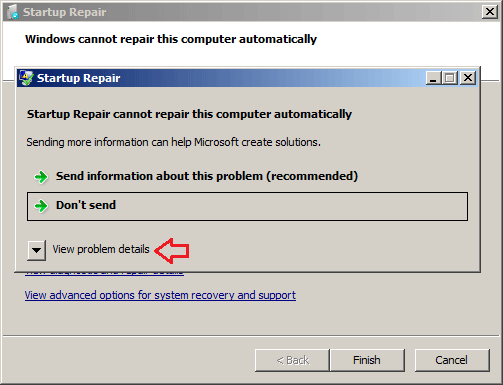
- The Startup Repair Tool begins analyzing startup log files for clues as to the source of the problem and then launches a serial of diagnostic tests to make up one's mind the crusade of the startup failure. After a long time, you will go a dialog saying that Startup Repair cannot repair this computer automatically! Click on View problem details.
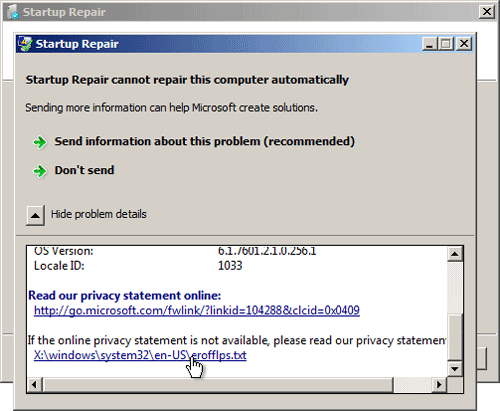
- Now roll down to the end of the Detail Report. Click on the final link to read Microsoft'due south offline privacy argument.
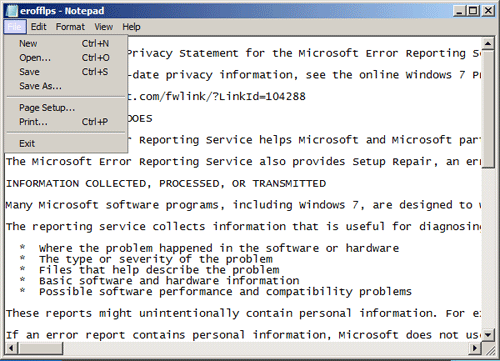
- Notepad will come with the privacy statement in it. Click on the File bill of fare and then Open up.
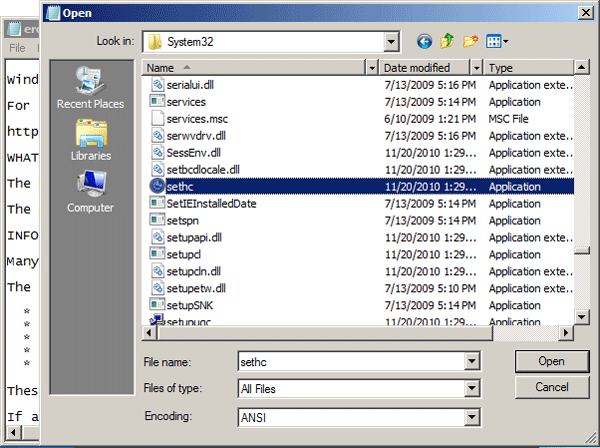
- In the File Open dialog box, alter the Files of type option to All Files. Scan to the Sticky Keys application - C:\windows\system32\sethc.exe. Rename this file as a backup file: I named it "sethc-copy".
- Now find the cmd.exe file in the same folder. This is your Control Prompt. rename it to sethc.exe.
And then close out of all the dialog boxes and Finish, so that the reckoner restarts.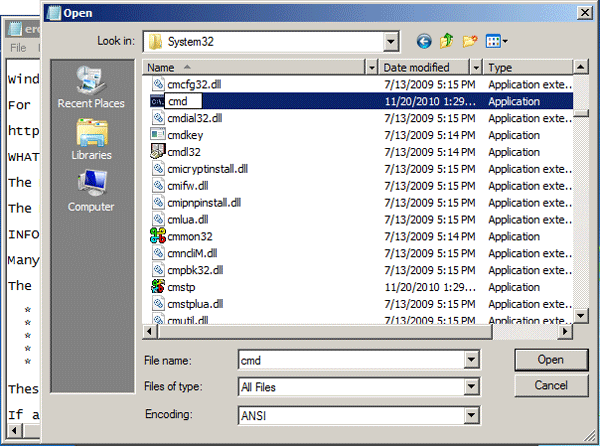
- In one case yous get to the Windows login screen, hit the Shift fundamental 5 times and information technology will open the Control Prompt window instead of the Sticky Keys awarding.
- At present to reset the password - just type the following command, replacing the username and password with the combination yous want:
internet user pinnacle-countersign.com 123456
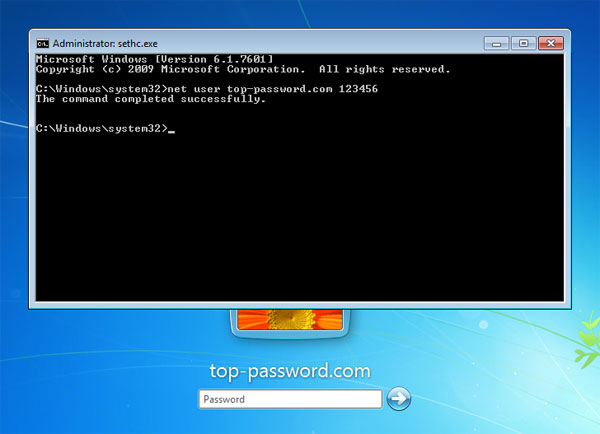
- Close the Control Prompt and you should exist able to log on to Windows with your new password.
Subsequently getting into Windows, recall to rename the sethc.exe dorsum to cmd.exe. That'due south it – You have successfully reset your forgotten Windows 8/vii countersign without a disk.
Related Manufactures


How To Reset Password On Windows 7 Home Premium Without Disk,
Source: https://www.top-password.com/knowledge/reset-windows-password-without-cd-usb.html
Posted by: fieldscized1961.blogspot.com
0 Response to "How To Reset Password On Windows 7 Home Premium Without Disk"
Post a Comment